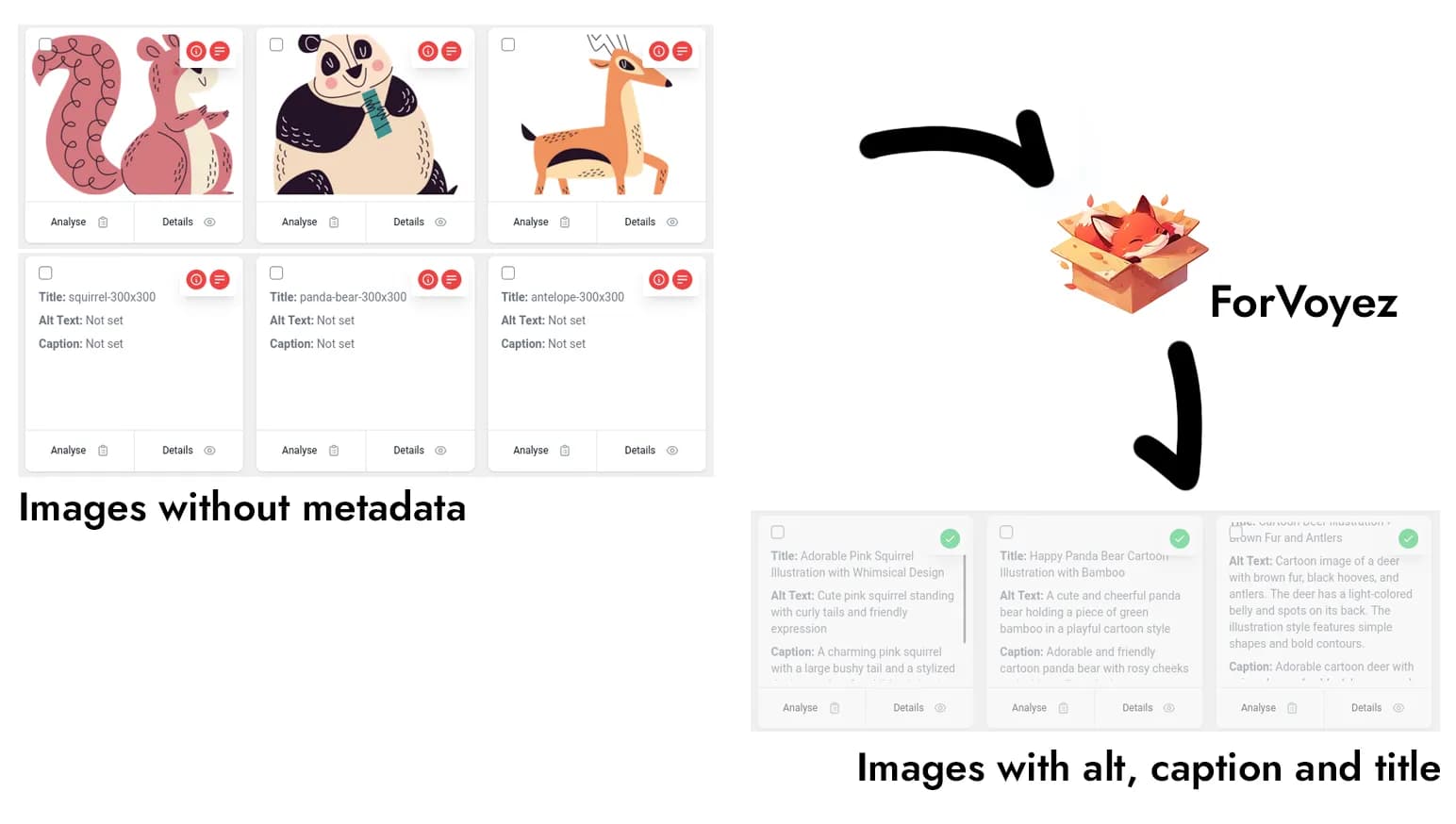
Image descriptions, handled right inside WordPress.
Generate alt text, titles, and captions from your media library. Connect your ForVoyez account once, then describe existing images in bulk or enable generation for new uploads.

Built for everyday publishing
Take care of your image descriptions in WordPress
Use AI to draft descriptions, process existing images, and keep new uploads from piling up.
- Alt text, titles, and captions
Let AI draft the image descriptions you would otherwise write by hand. Review and edit them to suit your content.
- Existing images, handled in bulk
Select several images in your media library and generate their descriptions together.
- New uploads, ready for descriptions
Turn on automatic generation for new uploads, or generate descriptions only when you choose.
- Descriptions that fit your content
Add context in the plugin settings to guide the descriptions, then edit the results in WordPress.
- Use your preferred language
Choose a language in the plugin settings so generated descriptions fit the language of your website.
- Your familiar WordPress dashboard
Manage your image descriptions where you already manage your website. No code to write.
From installation to your first descriptions
Three steps. No code to write.
The plugin is free to install. A ForVoyez account with available credits is required to generate descriptions.
Get your connection key →- 1. Install the plugin
- In WordPress, open Plugins → Add New and search for Auto Alt Text for Images. Install and activate it.
- 2. Connect your ForVoyez account
- Create an account, choose a plan, and copy your API key into the plugin settings. This key connects the plugin to your account; no coding is needed.
- 3. Generate and review your descriptions
- Select images in your media library to generate descriptions in bulk. Review the text, edit it if needed, and enable automatic generation for future uploads if you want.
Testimonials
Hear from our satisfied users
"The bulk image processing is amazing. We optimized thousands of product images really quickly, which has been a big help for our e-commerce site."


"The automatic alt text feature has really helped our visually impaired users. We've gotten some positive feedback from them."

"ForVoyez's plugin has saved us a ton of time on image optimization. It’s pretty handy, and the descriptions are usually well-optimized for SEO."

"The plugin's bulk processing feature allowed us to optimize thousands of product images in a matter of hours. It's been a game-changer for our e-commerce site."

"We love that we can customize the alt text to fit our brand voice. It helps keep things consistent without too much effort."
"The multi-language support has helped us reach an international audience. We’ve noticed a nice boost in SEO, especially for non-English markets."

Frequently asked questions
Stop putting off your image descriptions.
Start in WordPress.
Install the free plugin and connect your ForVoyez account. Choose a plan with enough credits for your media library, then generate and review your descriptions in WordPress.